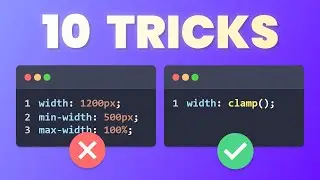
Stop using so many Media Queries - Use clamp() instead!
In this video, you’ll learn how to use the three most powerful CSS functions for modern responsive design: min(), max() and clamp().
Instead of writing tons of media queries, you’ll let the browser do the math and create fluid sizes that just work.
We’ll go through practical examples like fluid text, cards and sidebars, so you can start using these functions in your next project right away.
Learn More with My Courses
👉 JavaScript Course: https://www.udemy.com/course/javascri...
👉 HTML & CSS Complete Course: https://www.udemy.com/course/learn-ht...
In this CSS tutorial, we break down what min(), max() and clamp() actually do, how they are different, and when to use each one.
You’ll learn a simple mental model for all three functions and how to combine them with rem, vw and percentages to build truly responsive components without relying on dozens of breakpoints.
👉 Check out my website: https://coding2go.com
Key Concepts Covered
How CSS min(), max() and clamp() work
Mental model: smallest allowed size, largest allowed size, and safe range between min and max
Creating fluid font sizes without media queries
Making responsive card and sidebar widths with min() and max()
Using clamp() for padding, gaps and section widths
Avoiding common mistakes with mixed units and extreme screen sizes
Topics in this video
CSS, min(), max(), clamp(), css clamp tutorial, css min max functions, fluid typography, responsive css, modern css functions, css without media queries, responsive web design, css tips and tricks, html css beginner tutorial, css responsive layout, frontend development, Coding2GO
Auf dieser Seite können Sie das Online-Video Stop using so many Media Queries - Use clamp() instead! mit der Dauer stunde minuten sekunde in guter Qualität ansehen, das der Benutzer Coding2GO 09 Dezember 2025 hochgeladen hat, den Link mit Freunden und Bekannten teilen, dieses Video wurde auf Youtube bereits 141,040 Mal angesehen und es wurde von 8.5 tausend den Zuschauern gefallen. Viel Spaß beim Betrachtenden Zuschauern gefallen!