How to Install Deb Files on Ubuntu Linux
In this tutorial, you will learn how to install .deb files on Ubuntu Linux. .deb files are packages commonly used for software installation on Debian-based distributions like Ubuntu. Follow these steps to install .deb files on your Ubuntu system.
1. Download the .deb file: Visit the official website or trusted sources to download the .deb file for the software you want to install. Save it to a location on your computer.
2. Open the Terminal: Launch the Terminal application on your Ubuntu system. You can do this by searching for "Terminal" in the applications menu or using the Ctrl+Alt+T keyboard shortcut.
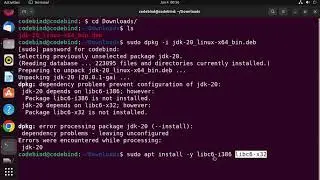
3. Navigate to the directory: Use the `cd` command to navigate to the directory where the .deb file is located. For example, if it's in the Downloads folder, you can use the command `cd Downloads`.
4. Install the .deb file: Run the installation command using the `dpkg` command. Enter the following command: `sudo dpkg -i filename.deb`. Replace `filename` with the actual name of the .deb file.
5. Resolve dependencies (if any): If there are any missing dependencies during the installation process, you can use the command `sudo apt-get install -f` to automatically resolve them.
6. Verify the installation: Once the installation is complete, you can verify it by running the installed software or checking for its presence in the applications menu.
That's it! You've successfully installed a .deb file on your Ubuntu Linux system. Enjoy using the software you just installed.
#UbuntuLinux #DebFiles #SoftwareInstallation #Terminal #LinuxCommands #UbuntuSoftware #LinuxTips #LinuxTutorial #PackageManagement #UbuntuApplications
Nesta página do site você pode assistir ao vídeo on-line How to Install Deb Files on Ubuntu Linux duração hora minuto segundo em boa qualidade , que foi baixado pelo usuário ProgrammingKnowledge2 04 Junho 2023, compartilhe o link com seus amigos e conhecidos, no youtube este vídeo já foi visto 61,680 vezes e gostou 566 espectadores. Boa visualização!