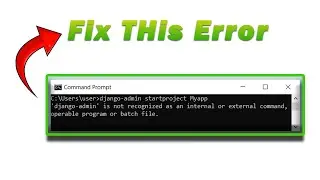
Django admin is not recognized as an internal or external command | Django Error | Fix this Error.
Today we learn, how to fix Django admin is not recognized as an internal or external command
The error message "Django admin is not recognized as an internal or external command" typically occurs when the Django admin command-line utility is not accessible from the command prompt or terminal. This can happen due to several reasons:
Django is not installed: If Django is not installed on your system, the Django admin command-line utility will not be available. Make sure you have installed Django by running pip install Django in your command prompt or terminal.
Virtual environment not activated: If you are working within a virtual environment, ensure that it is activated before running the Django admin command. Activating the virtual environment ensures that the necessary Django packages are accessible. Activate the virtual environment by executing the appropriate activation command based on your operating system and virtual environment tool.
Incorrect command: Double-check the command you are using to run the Django admin utility. The correct command is django-admin or python -m django. If you are using a different command, it might result in the error.
Incorrect PATH configuration: The PATH variable specifies the directories where the system looks for executable files. If the directory containing the Django admin script is not included in the PATH variable, the command prompt or terminal will not recognize it. Ensure that the directory containing the Django admin script (django-admin.py or django-admin) is added to the PATH variable. Refer to step 3 in the previous response for instructions on how to configure the PATH variable.
By addressing these potential issues, you should be able to resolve the "Django admin is not recognized as an internal or external command" error and successfully access the Django admin command-line utility.
✻ I really hope you find this helpful video. ♥
The instructions in this video tutorial can be applied to laptops, desktops, computers, and tablets which run the Windows 10 operating system like Windows 10 Home, Windows 10 Professional, Windows 10 Enterprise, and Windows 10 Education. This tutorial will work on all hardware manufacturers, like Dell, HP, Acer, Asus, Toshiba, Lenovo, and Samsung.
#sazidhabib #djangoerror #Django_admin_is_not_recognized_as_an_internal_or_external_command
--------------------------------------
Don't forget to like, comment, share and subscribe to my channel.
🌟 subscribe ⇢ / @sazidhabib
🌟🌟🌟Follow me on🌟🌟🌟
--------------------------------------
✅Facebook ⇢ https://www.facebook.com/sazidhabibof...
✅Facebook group ⇢ https://www.facebook.com/groups/32293...
✅Instagram ⇢ / sazidhabib
✅Twitter ⇢ / habibsazid
✅Pinterest ⇢ / sazidhabib88
------------------------------------------------------------------------
🌟🌟🌟More Videos You may like also 🌟🌟🌟
------------------------------------------
★★★ Software ★★★
Latest NetBeans IDE ⇢ • How to Install NetBeans IDE latest version...
All about CodeBlocks IDE ⇢ • How to Install CodeBlocks IDE on Windows 1...
Visual Studio 2022 ⇢ • How To Download and Install Visual Studio ...
Latest Java JDK ⇢ • How to Install Latest Java JDK on Windows...
Python 3.10.2 and PIP ⇢ • How to Install Python 3.10.2 and PIP on wi...
PyCharm IDE ⇢ • How to Install PyCharm IDE on Windows 10 |...
NetBeans 8.2 with Java JDK ⇢ • How to Download and Install NetBeans 8.2 w...
Oracle 19c Database ⇢ • how to install oracle 19c database on wind...
Latest Cisco Packet Tracer ⇢ • How To Download And Install Cisco Packet T...
★★★ VirtualBox ★★★
VirtualBox Free ⇢ • How To Install VirtualBox in Windows 10 Fr...
MacOS Big Sur On Windows 10 ⇢ • How to Install MacOS Big Sur On VirtualBox...
Full-Screen Mac OS Big Sur ⇢ • How To Full Screen Mac OS Big Sur on Virtu...
MacOS Catalina On Windows 10 ⇢ • How to Install MacOS Catalina On Windows 1...
Full Screen macOS Catalina ⇢ • How to Full Screen macOS Catalina on Virtu...
Ubuntu on Windows 10 ⇢ • How to Install Ubuntu on Windows 10 using ...
Kali Linux on Windows 10 ⇢ https://youtu.be/sktzaBr3x5Mhttps://y...
★★★ Account ★★★
Free License Account in jetbrains.com ⇢ • How to Create a free License Account in je...
Create Oracle Account free ⇢ • How to create Oracle Account free in 2022 ...
★★★ Games ★★★
Ori And The Will Of The Wisps FULL GAME [1080p Full HD 60fps] ⇢ • Ori And The Will Of The Wisps Walkthrough ...
Officially Forza Horizon 4 Demo ⇢ • How to Install Officially Forza Horizon 4 ...
★★★ Others ★★★
Google Play Store App on PC or Laptop ⇢ • How To Install Google Play Store App on PC...
Windows 11 on Mobile Browser ⇢ • How to Use Windows 11 on Mobile Browser or...
Disable Ads Notification Permanently On Chrome Browser ⇢ • How To Disable Ads Notification Permanentl...
Create Password Protect a Folder ⇢ • How To Create Password Protect a Folder in...
Nesta página do site você pode assistir ao vídeo on-line Django admin is not recognized as an internal or external command | Django Error | Fix this Error. duração hora minuto segundo em boa qualidade , que foi baixado pelo usuário Sazid Habib 03 Junho 2023, compartilhe o link com seus amigos e conhecidos, no youtube este vídeo já foi visto 45,421 vezes e gostou 1 mil espectadores. Boa visualização!












![How To Install Pygame In Python 3.11.2 on Windows 10/11 [ 2023 Update ] | PyGame Installation](https://image.4k-video.cc/id-video/kSdUHtUb_tw)
![How To Install PIP in Python 3.11 on Windows 10/11 [ 2023 Update ]](https://image.4k-video.cc/id-video/ec5vjIg0bUA)

![How To Install Pygame In Python 3.12 on Windows 10/11 [ 2023 Update ] | PyGame Installation](https://image.4k-video.cc/id-video/6xd9r6aflWg)
![How to Create a free License Account in jetbrains.com | [ 2022 Update ]](https://image.4k-video.cc/id-video/XjzHre_rHJk)