💡 What is Bevel and Edge Slide in Blender? Read the description👇
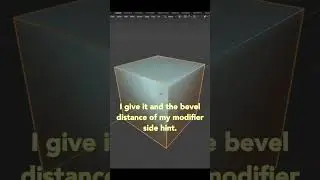
👉 Blender's Bevel tool is used to create chamfers or fillets from the edges of a mesh. You can either use it via the toolbar or by pressing the hotkey Ctrl B.
👉 Edge Slide is great for moving an edge along the direction of the surrounding edges. The fastest way to get to it is by pressing G for grab and then immediately pressing G again to toggle a slide. You can also slide vertices using the same method.
👉 Loops, paths of connected edges, are one of the core concepts in 3D modeling. To select a loop, use the hotkey Alt LMB. If you're using the Emulate 3 Button Mouse option, double click on an edge instead. To add a new edge loop, use the hotkey Ctrl R and hover your mouse over an edge that runs perpendicular to the path you want the new loop to take.
Auf dieser Seite können Sie das Online-Video 💡 What is Bevel and Edge Slide in Blender? Read the description👇 mit der Dauer stunde minuten sekunde in guter Qualität ansehen, das der Benutzer CG Cookie 09 April 2024 hochgeladen hat, den Link mit Freunden und Bekannten teilen, dieses Video wurde auf Youtube bereits 5,279 Mal angesehen und es wurde von 249 den Zuschauern gefallen. Viel Spaß beim Betrachtenden Zuschauern gefallen!