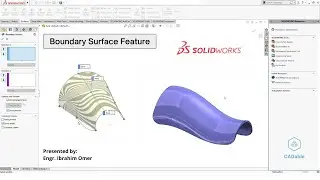
Boundary Surface Feature | Solidworks Boundary Surface | Boundary Surface with Guide Curves
Boundary Surface Feature | Solidworks Boundary Surface | Boundary Surface with Guide Curves | CADable | CADable tutorials
Boundary Surface Feature inHi friends, welcome back to CADable! This is Engr. Ibrahim Omer. In today's tutorial, we will learn how to use the SolidWorks Boundary Surface feature with guide curves. We'll walk through an example, creating different sections and curves, and then using the boundary surface command to generate a smooth surface.
Here's what you'll learn:
Creating sections and guide curves.
Using the Boundary Surface command.
Converting the surface body to a solid body using the Thicken command.
Applying appearance to the solid body.
Using the Fillet command to remove sharp edges.
This tutorial is perfect for beginners. I hope you find it helpful!
Chapters of the tutorial:
Introduction 0:00
Creating sections using three point arc 0:36
Creating guide curves using spline 2:06
Boundary surface feature 3:08
Surface to solid using thicken command 3:42
Applying appearance 4:06
Applying fillet on sharp corners 4:21
Conclusion 4:39
Take your time, hit pause if needed, and feel free to drop any questions in the comments. Remember, practice makes perfect!
Don't forget to subscribe to our channel for more tutorials like this:
/ cadable
#solidworksboundarysurface #boundarysurfacefeature #surfaceswithguidecurves #CADable #CADabletutorials
On this page of the site you can watch the video online Boundary Surface Feature | Solidworks Boundary Surface | Boundary Surface with Guide Curves with a duration of hours minute second in good quality, which was uploaded by the user CADable 03 August 2024, share the link with friends and acquaintances, this video has already been watched 367 times on youtube and it was liked by 9 viewers. Enjoy your viewing!