Tutorial: Rendering 2D Icons as 3D Objects in Blender
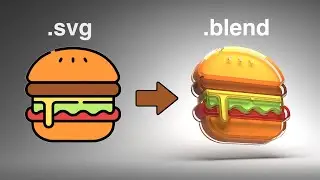
Learn how to convert any 2D vector icon into a detailed ray traced 3D render! We'll use Blender to extrude SVG icons into 3D geometry and render the result with a simple glass material in a smooth lighting setup.
If you want to support the channel: / polyfjord
Software used in this video:
Blender - The free and open source 3D software:
https://www.blender.org/download/
Note: The website mentioned in this video (flaticon.com) has decided to put all their SVG icons behind a paywall. But fear not, there are other places to get different free icons! And even better, some of them are open source too:
Feather Icon (Open source): https://feathericons.com/
Google Fonts Icons (Open source): https://fonts.google.com/icons
Timestamps:
00:00 Where to find free icons
00:36 Import and extrude
02:34 Lighting studio setup
05:12 Material setup
05:57 Tweaks before rendering
07:28 Saving the image
08:02 The SVG workflow
09:50 Thanks for watching!
#b3d #opensource #vectorgraphics
Follow Polyfjord on Instagram for more updates:
/ polyfjord
Hamburger icon by Freepik from www.flaticon.com
MUSIC:
Note: Purchases made through the links below may provide some compensation to Polyfjord. (This is a great way to support the channel!):
🎵 Intro Song:
https://shutterstock.7eer.net/b32eLx
🎵 Outro Song:
https://shutterstock.7eer.net/EaJjk4
On this page of the site you can watch the video online Tutorial: Rendering 2D Icons as 3D Objects in Blender with a duration of hours minute second in good quality, which was uploaded by the user Polyfjord 01 August 2021, share the link with friends and acquaintances, this video has already been watched 3,248,772 times on youtube and it was liked by 142 thousand viewers. Enjoy your viewing!